
In the following we will have a look at how you can use the risk assessment template to support your GDPR compliance.
How to Use the Risk Assessment Template?
As part of your GDPR compliance work, you should already have mapped all your processing activities and the assets used for these activities. This means you have listed where and how personal data is processed, and which systems, software, or tools are involved. This mapping is the foundation for your GDPR compliance, and also your risk assessment.
The purpose of a risk assessment is to determine whether the processing of personal data is safe for the individuals whose data you process, and to ensure that your organisation has appropriate measures in place to protect them. To do this, you need to assess the risks related to each processing activity or asset.
See the template in action in the following video.
What activity/asset are you assessing?
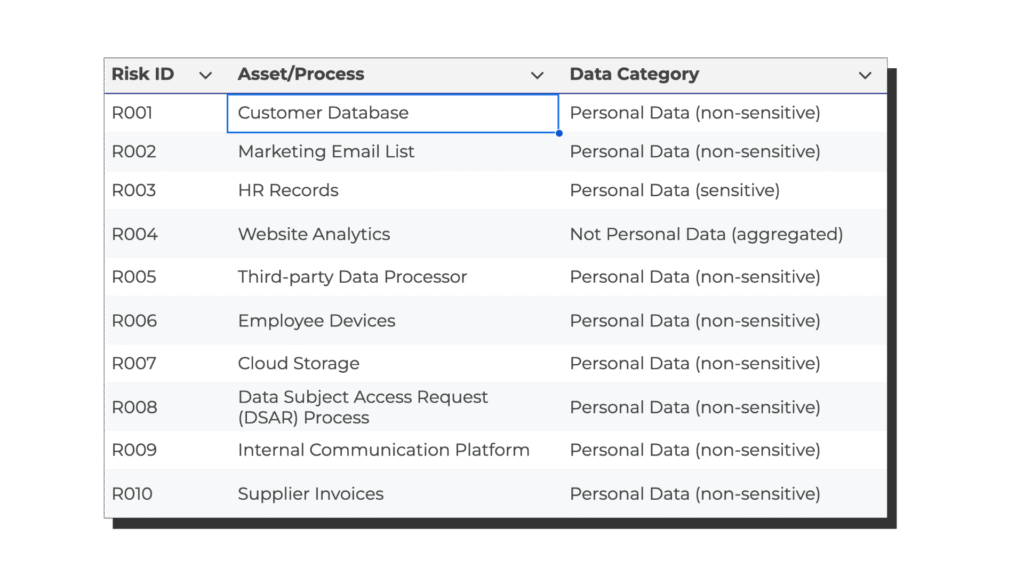
Start by selecting one processing activity or asset from your mapping to be the focus of the risk assessment. In this example, we will use an asset called Customer Database, which is also listed in the first row of the risk assessment Excel template. This customer database contains personal data about customers, such as names, contact details, and purchase or transaction history.
Identify Threats
The first step in the assessment is to identify potential threats that could affect the asset.
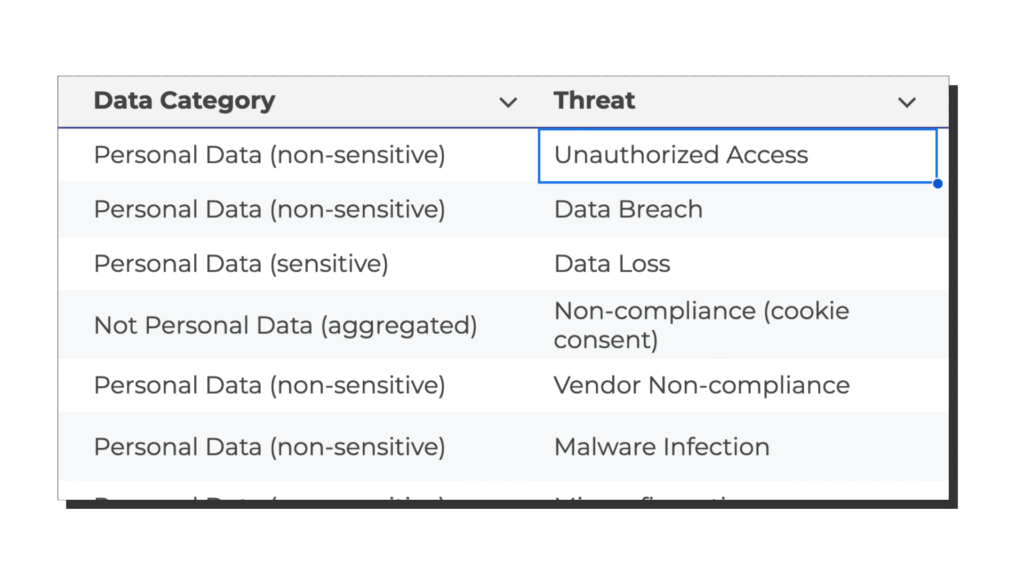
In our example, we identify a single threat: unauthorised access to the customer database. This threat could have a negative effect on the three key principles of information security, which is called the CIA triad, which stands for Confidentiality, Integrity, and Availability. Confidentiality refers to ensuring that personal data is only accessible to authorised people. If an internal employee, or an outsider, without proper authorization gains access to personal data in the database, confidentiality is broken. Integrity means that data must remain accurate and unchanged, so we must be able to trust the integrity of the data. If an attacker manipulates or deletes records in the database, the integrity is lost. Availability means that data must be accessible when needed for legitimate purposes. If the system is locked, encrypted, or taken offline, the availability is affected. So, this threat of “unauthorised access to the customer database” can affect all three elements of the CIA triad.
Identify Vulnerabilities
Next, you need to identify any vulnerabilities that make this threat more likely to occur. A vulnerability is a weakness in your system, process, peoples behaviour or controls that could be exploited. In this example, we identify weak access controls as a central vulnerability. This could mean that not all users have unique logins, that passwords are not strong enough, or that access rights are not regularly reviewed.

Assessing the Impact of a Threat
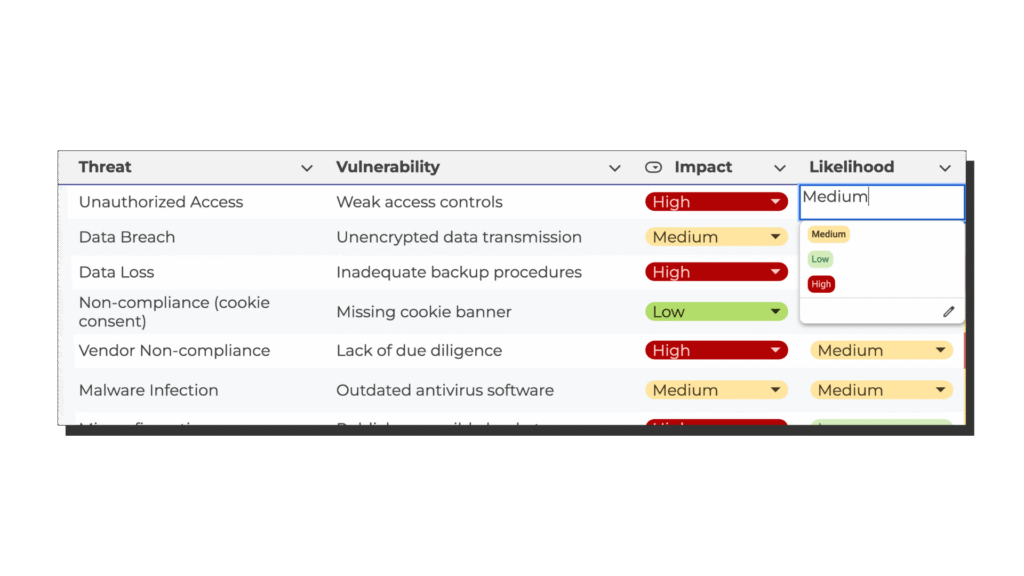
After identifying the threat and the vulnerability, you can assess the impact and likelihood of the threat happening. The impact describes how serious the consequences would be for the data subjects if the threat occurred. If an unauthorised person accessed the customer database, it could expose personal information and financial details. This could lead to identity theft, fraud, or other harm to the data subjects. For this reason, we rate the impact as high.

Assessing the Likelihood of a Threat
The likelihood describes how probable it is that the threat could actually happen. Because we have identified weak access controls, it is realistic that unauthorised access could occur. We therefore assess the likelihood as medium.
Risk Level
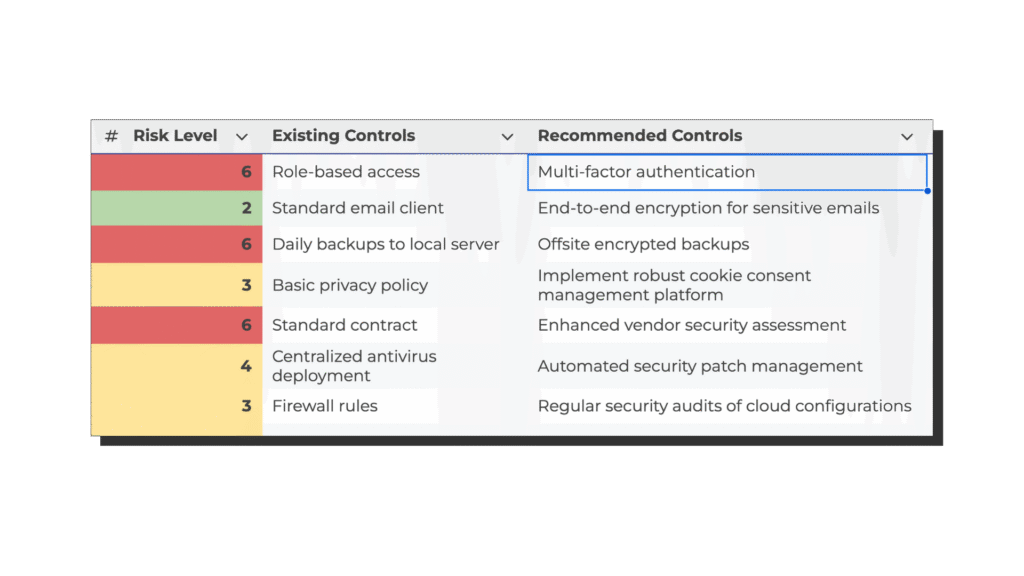
Now that we have both an impact and a likelihood rating, we can calculate a risk score. To do this in a simple way, we can assign numbers to each level: low equals 1, medium equals 2, and high equals 3. The risk score is then calculated by multiplying the impact by the likelihood. In our example, the impact is high (3) and the likelihood is medium (2), which results in a risk score of 6.
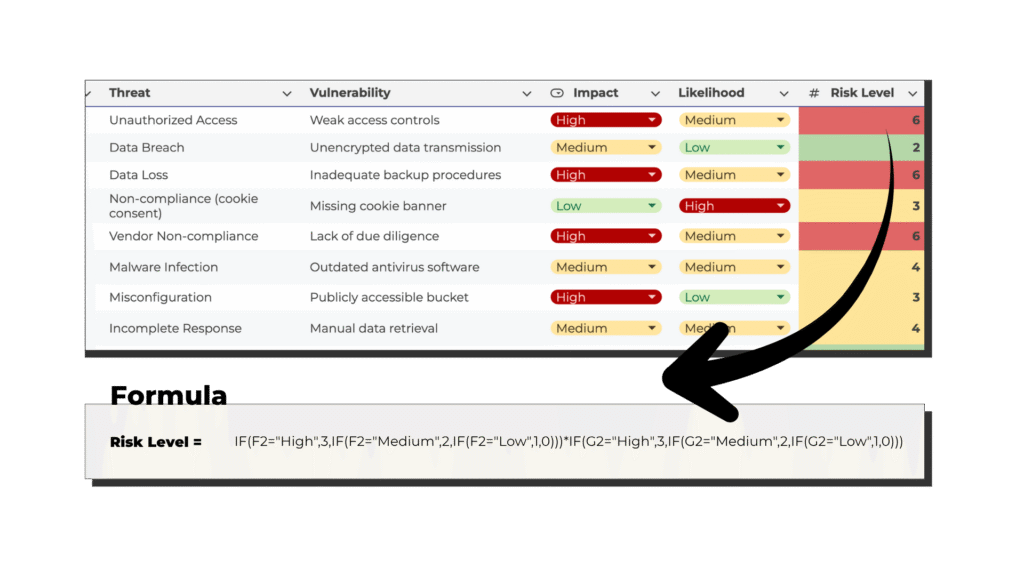
This numeric score allows you to compare risks across your organisation. For example, you can see which risks are most critical and which ones can be managed with existing measures. In this case, a score of 6 is considered high. This means that the risk must be reduced to reach an acceptable level before the processing can be considered adequately protected.
Risk Reduction Measures
To reduce the risk, you should look at what controls you already have in place and what additional actions can be taken.
In our example, we already have role-based access control implemented, meaning that only employees with specific job functions have access to the customer database. This helps ensure that only relevant staff can see and manage customer data. However, it might be useful to review this measure given the identified vulnerabilities. Furthermore, because the risk is still high, we decide to add multi-factor authentication (MFA). MFA adds an extra step when logging in, such as a verification code on a mobile device, and it significantly reduces the likelihood that someone can gain unauthorised access.
Implementing Controls
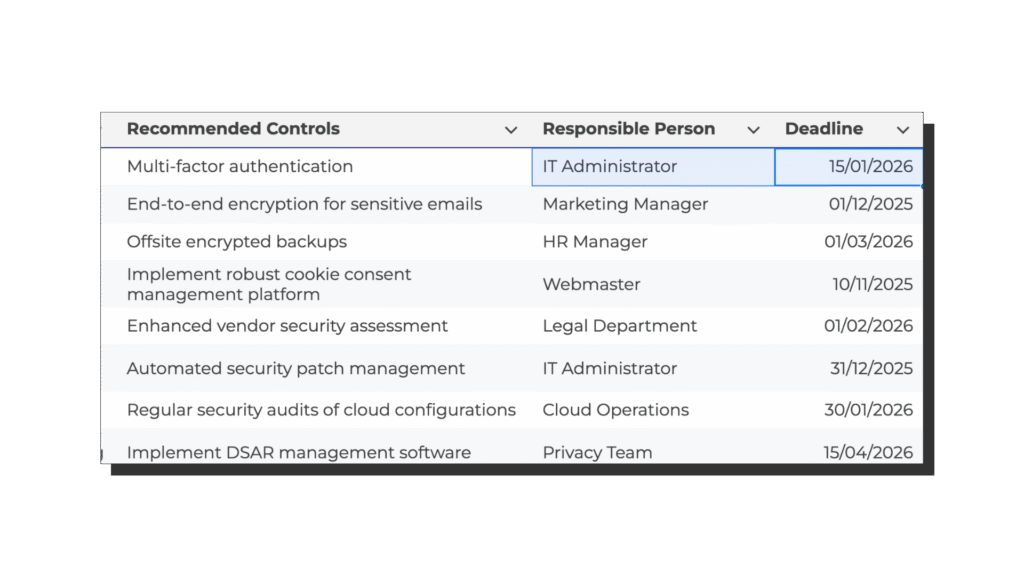
Every risk-reducing action should have a clearly defined responsible person and a deadline for implementation. This ensures accountability and allows follow-up to confirm that the measures have been applied effectively. These details can easily be recorded directly in the Excel template under the relevant columns for “Responsible Person” and “Deadline”.
Update
By using this risk assessment template, you make your GDPR compliance process both structured and transparent. You gain an overview of all identified risks, document your reasoning and decisions, and demonstrate that you actively work to protect the personal data you process.
The template also makes it easier to review and update your risk assessments regularly. As your organisation grows or your processing activities change, you can update the sheet, add new risks, and record how existing risks have been reduced over time. This ongoing process helps you maintain a consistent approach to data protection and it documents your efforts to reduce risk, which is a requirement for GDPR compliance.
Download Risk Assessment Template Excel
Download the excel file with the Risk Assessment Template to start using it for your GDPR compliance.
It’s a simple Excel sheet where you can list your processing activities and assets, note the related threats and vulnerabilities, and record your scores and actions. It helps you keep track of what needs attention, who’s responsible, and when things should be done. The template is easy to adjust to your own setup, so you can make it fit your organisation. Download it below and give it a try.


